
CapCut Design Studio x Dribbble: Product Drop Challenge
A product idea is just the start. Here's where it becomes real. CapCut just launched Design Studio 2.0, and we want to see what you can build with it.


What Is Design Studio?
CapCut’s Design Studio is a new AI-powered tool built for pure creative experimentation. It’s designed to support your ideation process, design development, and final presentation.
No more rigid frames or jumping between apps. With the new “Infinite Canvas,” you can map out references, test iterations, and finalize visuals side-by-side on one boundless board. It’s your entire creative process, streamlined.
The Brief
Imagine a product, and build the brand around it. Create the logo, packaging, and campaign visual, all inside CapCut Design Studio.
This isn't a template exercise. It's a portfolio-worthy brief with real creative stakes: one cohesive product drop, built from scratch, ready to share.
How to Enter (all steps required)
Sign up for a free Dribbble account if you don't have one already.
Head to CapCut Design Studio and explore the canvas to get started.
Create your cohesive product drop: logo, packaging, and campaign visual.
Rebound your shot on Dribbble.
Share your experience and upload your designs to this form.
Please review the Dribbble Playoff Rules before submitting.
Winners!
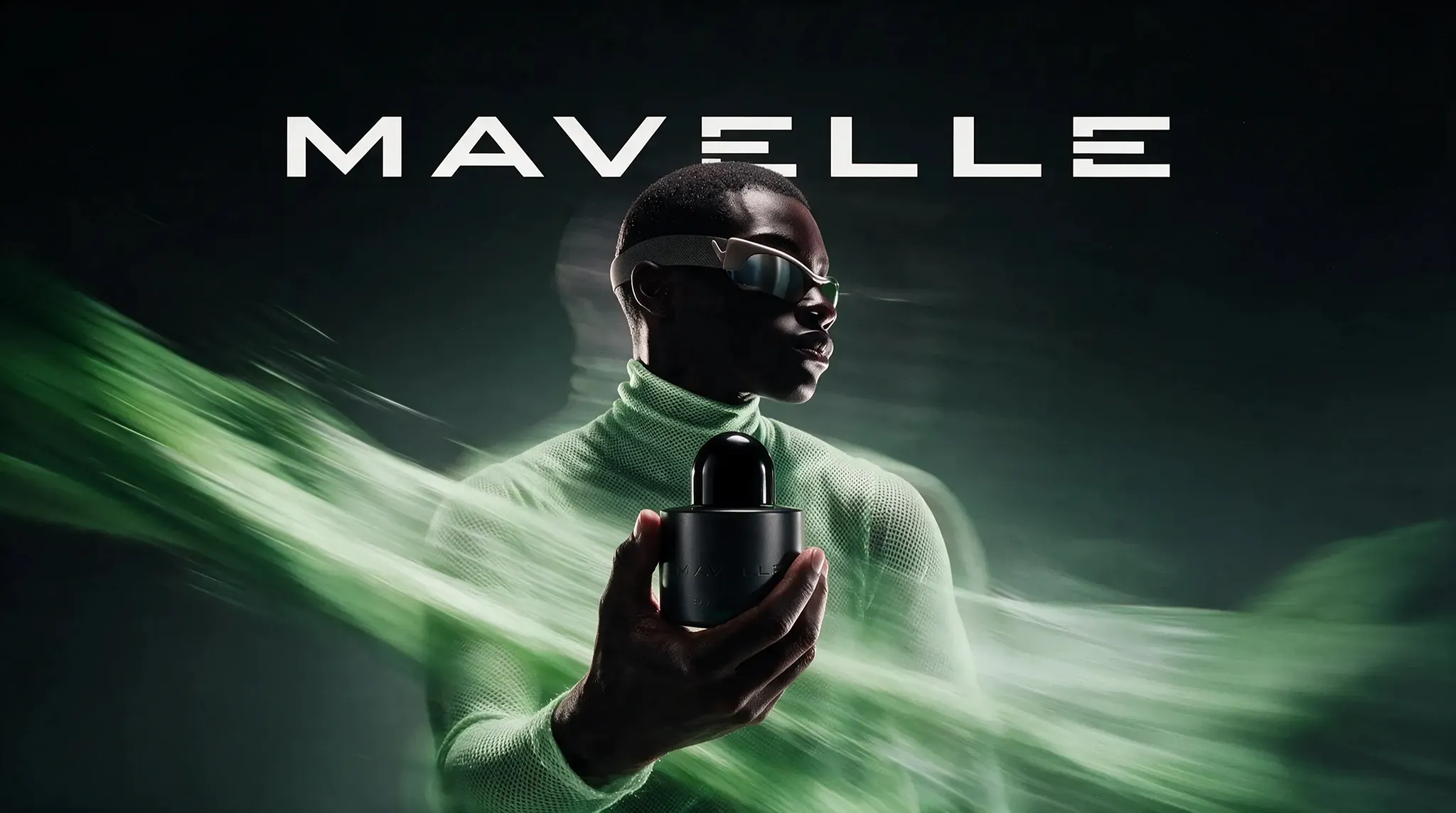


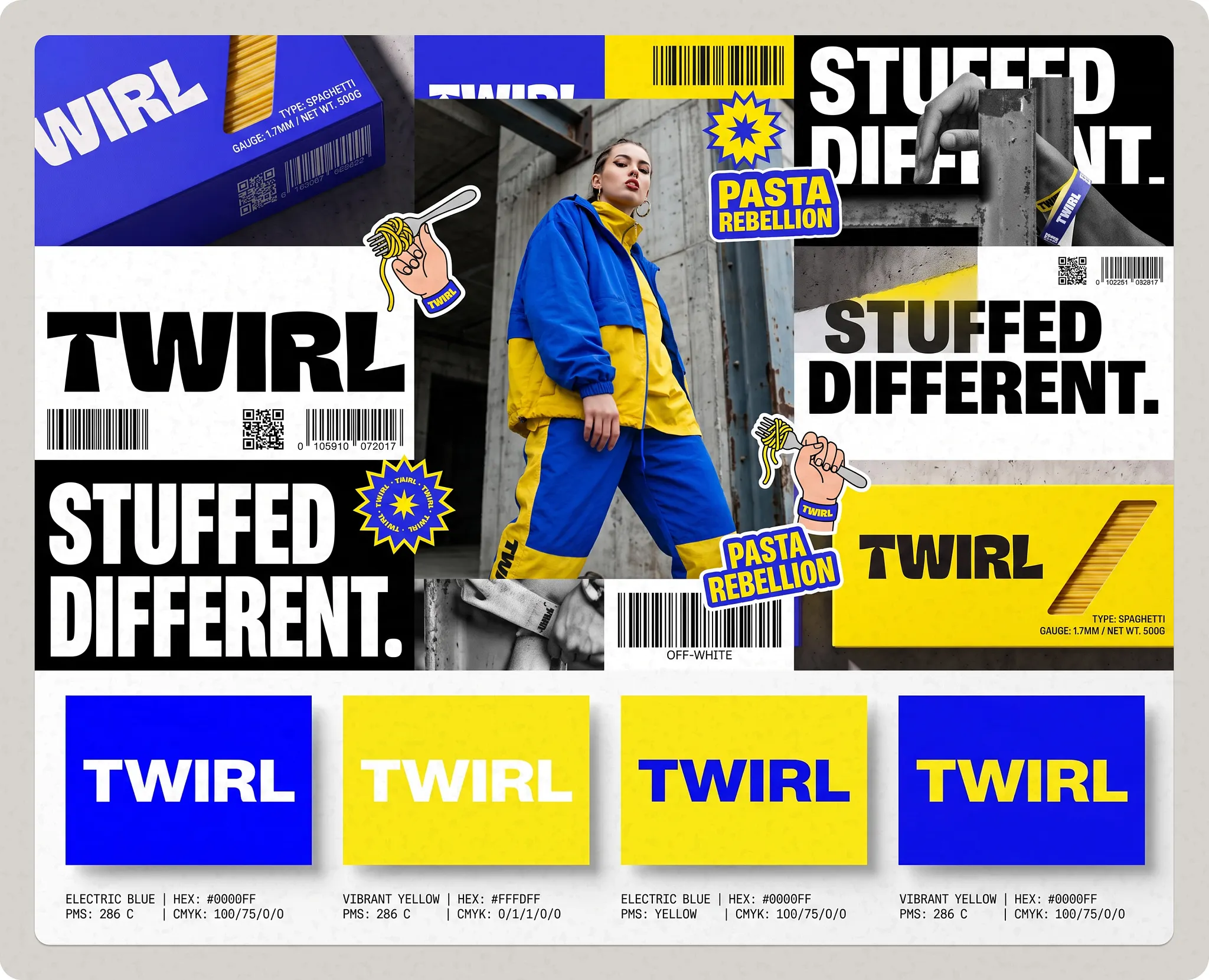





Guidelines

Package

Campaign visual

Logo
Originality, visual quality, and a clear creative point of view. The strongest submissions will show how Design Studio can support a real design workflow: testing directions, building assets, moving from a blank canvas to portfolio-ready execution.
Guidelines
Guidelines
How To Stand Out and Increase Your Chances of Winning:
Spend real time exploring Design Studio: the AI agent, manual editing tools, and Infinite Canvas together. The judges will notice entries that clearly push past the defaults and use the product to its full potential.
Don't over-invest in the product concept itself: a simple product idea executed brilliantly beats a complex one executed halfway. The brief rewards craft on the assets, not the invention.
Be bold across logo, packaging, and campaign visual: Safe, generic choices blend in, distinct typography, unexpected color combos, and a strong point of view stand out in a crowded submission pool.
Treat the campaign visual like a real launch asset: Ask, would this stop someone scrolling? What's the hook, the mood, the story in one frame?
Use both the AI agent and manual edit tools together: AI for speed/exploration, manual refinement for polish and precision.
Browse the Inspiration section first, before you start it'll calibrate your eye for what "portfolio-ready" looks like on this platform.
Great prizes

$10,000 cash + 1 year CapCut Pro + 10,000 credits
$10,000 cash + 1 year CapCut Pro + 10,000 credits
🥇 Grand Prize
1 winner

MacBook Pro + 6 months CapCut Pro + 5,000 credits
MacBook Pro + 6 months CapCut Pro + 5,000 credits
🥈 2nd Place
1 winner

iPad Pro + 6 months CapCut Pro + 2,000 credits
iPad Pro + 6 months CapCut Pro + 2,000 credits
🥉 3rd Place
1 winner
MacBook Pro + 6 months CapCut Pro + 2,000 credits
MacBook Pro + 6 months CapCut Pro + 2,000 credits
❤️ Most Liked
1 winner

3 months CapCut Pro
3 months CapCut Pro
👏 Top Entries
20 winners
All winners will also have their work featured across CapCut's social channels and in a dedicated Dribbble collection. Judging will be conducted by the CapCut team. • Most Liked refers to the entry with the highest number of likes in the Dribbble community, while Top Entries refers to the next 20 most liked entries, excluding the Most Liked winner.
Challenge timeline
Submission start date
July 07, 2026
Submission end date
August 04, 2026
Winner announcement date
August 18, 2026
Popular entries

Popular entries
Great prizes
$10,000 cash + 1 year CapCut Pro + 10,000 credits
🥇 Grand Prize
1 winner
MacBook Pro + 6 months CapCut Pro + 5,000 credits
🥈 2nd Place
1 winner
iPad Pro + 6 months CapCut Pro + 2,000 credits
🥉 3rd Place
1 winner
MacBook Pro + 6 months CapCut Pro + 2,000 credits
❤️ Most Liked
1 winner
3 months CapCut Pro
👏 Top Entries
20 winners
All winners will also have their work featured across CapCut's social channels and in a dedicated Dribbble collection. Judging will be conducted by the CapCut team. • Most Liked refers to the entry with the highest number of likes in the Dribbble community, while Top Entries refers to the next 20 most liked entries, excluding the Most Liked winner.
Challenge timeline
Submission start date
July 07, 2026
Submission end date
August 04, 2026
Winner announcement date
August 18, 2026
CapCut Design Studio x Dribbble: Product Drop Challenge
A product idea is just the start. Here's where it becomes real. CapCut just launched Design Studio 2.0, and we want to see what you can build with it.
CapCut Design Studio x Dribbble: Product Drop Challenge
A product idea is just the start. Here's where it becomes real. CapCut just launched Design Studio 2.0, and we want to see what you can build with it.
CapCut Design Studio x Dribbble: Product Drop Challenge
A product idea is just the start. Here's where it becomes real. CapCut just launched Design Studio 2.0, and we want to see what you can build with it.
Great prizes
$10,000 cash + 1 year CapCut Pro + 10,000 credits
🥇 Grand Prize
1 winner
MacBook Pro + 6 months CapCut Pro + 5,000 credits
🥈 2nd Place
1 winner
iPad Pro + 6 months CapCut Pro + 2,000 credits
🥉 3rd Place
1 winner
Challenge timeline
Start date
July 07, 2026
End date
August 04, 2026
Announcement date
August 18, 2026
Popular entries
Great prizes
$10,000 cash + 1 year CapCut Pro + 10,000 credits
🥇 Grand Prize
1 winner
MacBook Pro + 6 months CapCut Pro + 5,000 credits
🥈 2nd Place
1 winner
iPad Pro + 6 months CapCut Pro + 2,000 credits
🥉 3rd Place
1 winner
MacBook Pro + 6 months CapCut Pro + 2,000 credits
❤️ Most Liked
1 winner
3 months CapCut Pro
👏 Top Entries
20 winners
All winners will also have their work featured across CapCut's social channels and in a dedicated Dribbble collection. Judging will be conducted by the CapCut team. • Most Liked refers to the entry with the highest number of likes in the Dribbble community, while Top Entries refers to the next 20 most liked entries, excluding the Most Liked winner.
What Is Design Studio?
CapCut’s Design Studio is a new AI-powered tool built for pure creative experimentation. It’s designed to support your ideation process, design development, and final presentation.
No more rigid frames or jumping between apps. With the new “Infinite Canvas,” you can map out references, test iterations, and finalize visuals side-by-side on one boundless board. It’s your entire creative process, streamlined.
The Brief
Imagine a product, and build the brand around it. Create the logo, packaging, and campaign visual, all inside CapCut Design Studio.
This isn't a template exercise. It's a portfolio-worthy brief with real creative stakes: one cohesive product drop, built from scratch, ready to share.
How to Enter (all steps required)
Sign up for a free Dribbble account if you don't have one already.
Head to CapCut Design Studio and explore the canvas to get started.
Create your cohesive product drop: logo, packaging, and campaign visual.
Rebound your shot on Dribbble.
Share your experience and upload your designs to this form.
Please review the Dribbble Playoff Rules before submitting.

Design
Create a complete fictional product launch using CapCut Design Studio.

Rebound
Rebound this shot with your final entry and include your product drop presentation.

Win
Selected designers will win prizes and have their work featured.

Outfits

Hairstyles
Accessories
Eyewear
Design an original PUBG MOBILE outfit with clear front and back views. Matching accessories from the categories above are optional but encouraged. All designs must fit PUBG MOBILE’s aesthetic and follow the official template.
Winners!
Package
Campaign visual
Logo
Originality, visual quality, and a clear creative point of view. The strongest submissions will show how Design Studio can support a real design workflow: testing directions, building assets, moving from a blank canvas to portfolio-ready execution.
Guidelines
CapCut Design Studio x Dribbble: Product Drop Challenge
A product idea is just the start. Here's where it becomes real. CapCut just launched Design Studio 2.0, and we want to see what you can build with it.
CapCut Design Studio x Dribbble: Product Drop Challenge
A product idea is just the start. Here's where it becomes real. CapCut just launched Design Studio 2.0, and we want to see what you can build with it.
CapCut Design Studio x Dribbble: Product Drop Challenge
A product idea is just the start. Here's where it becomes real. CapCut just launched Design Studio 2.0, and we want to see what you can build with it.
What Is Design Studio?
CapCut’s Design Studio is a new AI-powered tool built for pure creative experimentation. It’s designed to support your ideation process, design development, and final presentation.
No more rigid frames or jumping between apps. With the new “Infinite Canvas,” you can map out references, test iterations, and finalize visuals side-by-side on one boundless board. It’s your entire creative process, streamlined.
The Brief
Imagine a product, and build the brand around it. Create the logo, packaging, and campaign visual, all inside CapCut Design Studio.
This isn't a template exercise. It's a portfolio-worthy brief with real creative stakes: one cohesive product drop, built from scratch, ready to share.
How to Enter (all steps required)
Sign up for a free Dribbble account if you don't have one already.
Head to CapCut Design Studio and explore the canvas to get started.
Create your cohesive product drop: logo, packaging, and campaign visual.
Rebound your shot on Dribbble.
Share your experience and upload your designs to this form.
Please review the Dribbble Playoff Rules before submitting.
Design
Create a complete fictional product launch using CapCut Design Studio.
Rebound
Rebound this shot with your final entry and include your product drop presentation.
Win
Selected designers will win prizes and have their work featured.
Great prizes
$10,000 cash + 1 year CapCut Pro + 10,000 credits
🥇 Grand Prize
1 winner
MacBook Pro + 6 months CapCut Pro + 5,000 credits
🥈 2nd Place
1 winner
iPad Pro + 6 months CapCut Pro + 2,000 credits
🥉 3rd Place
1 winner
MacBook Pro + 6 months CapCut Pro + 2,000 credits
❤️ Most Liked
1 winner
3 months CapCut Pro
👏 Top Entries
20 winners
All winners will also have their work featured across CapCut's social channels and in a dedicated Dribbble collection. Judging will be conducted by the CapCut team. • Most Liked refers to the entry with the highest number of likes in the Dribbble community, while Top Entries refers to the next 20 most liked entries, excluding the Most Liked winner.
Popular entries
Challenge timeline
Submission start date
July 07, 2026
Submission end date
August 04, 2026
Winner announcement date
August 18, 2026
Winners!
Package
Campaign visual
Logo
Originality, visual quality, and a clear creative point of view. The strongest submissions will show how Design Studio can support a real design workflow: testing directions, building assets, moving from a blank canvas to portfolio-ready execution.
Guidelines
CapCut Design Studio x Dribbble: Product Drop Challenge
A product idea is just the start. Here's where it becomes real. CapCut just launched Design Studio 2.0, and we want to see what you can build with it.
CapCut Design Studio x Dribbble: Product Drop Challenge
A product idea is just the start. Here's where it becomes real. CapCut just launched Design Studio 2.0, and we want to see what you can build with it.